How to Transfer a Japan eSIM to a New Phone
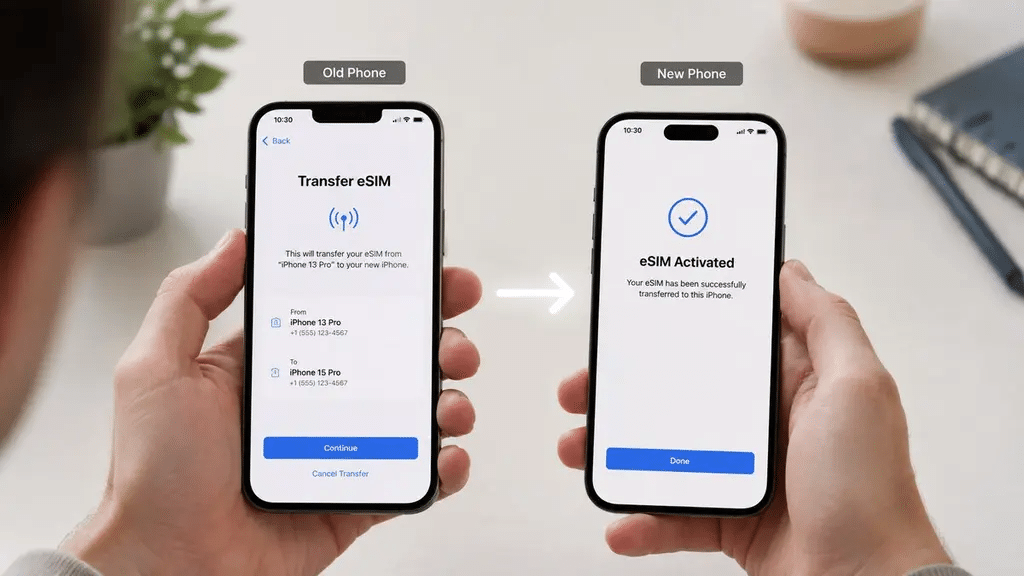
Getting a new phone is exciting. Discovering that your Japan eSIM does not automatically transfer to it is less exciting. The situation becomes even more frustrating if you are in the middle of a trip or still have weeks left on an active plan.
The Japan eSIM transfer question is one of the more technical topics in eSIM management. It requires a clear explanation of what you can transfer, what you cannot transfer, and when you need a new eSIM profile.
The main challenge comes from how eSIM technology works. A physical SIM card can move from one phone to another. An eSIM profile works differently. The carrier installs the profile on the device’s embedded SIM hardware. You cannot simply remove that profile as a portable file and install it on another phone.
This guide explains your options when you need to use a Japan eSIM on a new device. It covers Apple and Android transfer features, Japan Sim Data’s reissuance process, and practical steps for restoring connectivity after changing phones.
Why eSIM Transfer Is More Complex Than SIM Swapping

How eSIM Profiles Work
When you install a Japan Sim Data eSIM, the carrier provisions a profile onto the eSIM hardware inside your phone. The process uses secure authentication and device information, including the EID (Embedded Identity Document).
The QR code does not contain a portable copy of your eSIM. Instead, it starts the provisioning process that downloads the eSIM profile to your device.
Once you use the QR code, you generally cannot treat it like a physical SIM card. You cannot remove the profile from one phone and install that same profile on another phone.
What does this mean in practice?
A Japan eSIM transfer usually requires the provider to issue a new profile for the new device. The provider does not physically move the original profile from one phone to another.
iPhone-to-iPhone eSIM Transfer
Apple’s eSIM Quick Transfer
Apple introduced eSIM Quick Transfer with iOS 16. The feature allows users to transfer certain cellular plans directly from one iPhone to another.
However, carrier support determines whether the feature works with a particular eSIM. Travel eSIM providers may not support Apple’s transfer system.
Apple eSIM Quick Transfer requirements generally include:
- Both iPhones must support the required iOS version.
- The carrier must support eSIM Quick Transfer.
- Both devices must meet Apple’s requirements for the transfer.
- The cellular plan must support the transfer feature.
For domestic carrier plans, Quick Transfer can provide a convenient device-to-device experience. For third-party travel eSIMs such as Japan Sim Data, availability depends on provider support.
How to Check for a Direct Transfer
When setting up your new iPhone:
- Place the new iPhone near your old iPhone.
- Start the Quick Start setup process.
- Follow the instructions to transfer your data.
- Check whether the cellular plan transfer option appears.
- If the Japan Sim Data eSIM appears, follow the on-screen instructions.
- If it does not appear, use the provider’s reissuance process instead.
Important: Do not assume that Apple Quick Transfer will work with every Japan travel eSIM. If the Japan Sim Data plan does not appear as transferable, you will need a new eSIM profile for the new device.
Manual iPhone-to-iPhone eSIM Process
If direct transfer does not work, contact Japan Sim Data for assistance with moving an active plan to your new device.
A typical process involves:
- Confirm that the new iPhone supports eSIM.
- Confirm that the new iPhone has no carrier restrictions.
- Contact Japan Sim Data support with your order details.
- Ask whether your active plan qualifies for reissuance.
- Follow the provider’s instructions for the old eSIM.
- Receive the new QR code if reissuance is available.
- Scan the new QR code on the new iPhone.
- Follow the installation instructions.
This process is a reissuance, not a traditional SIM transfer. The provider creates a new eSIM profile for the new device.
Android-to-Android eSIM Transfer
Android eSIM Transfer Options
Android eSIM transfers depend heavily on the manufacturer, device model, Android version, and carrier.
Google and Samsung support eSIM management on many modern devices. However, direct transfers do not work universally with third-party international travel eSIMs.
For this reason, travelers should not assume that an Android phone can transfer a Japan eSIM simply because the device supports eSIM.
Google Pixel
Google offers eSIM transfer functionality on supported Pixel devices and compatible carrier plans. However, third-party travel eSIM compatibility can vary.
If your Japan Sim Data eSIM does not appear during the Pixel transfer process, contact Japan Sim Data for reissuance instead.
Samsung Galaxy
Samsung provides eSIM management through the SIM manager on supported Galaxy devices. Direct transfer options depend on the device and carrier.
For a Japan Sim Data plan, check whether the transfer option appears during the device setup. If it does not, use the provider’s reissuance process.
Cross-Platform eSIM Transfer
iPhone to Android
Moving a Japan eSIM from an iPhone to an Android phone does not work like moving a physical SIM card.
Apple and Android use different transfer systems. A third-party travel eSIM may also require provider-side reissuance.
If you change from iPhone to Android, contact Japan Sim Data and request a new eSIM profile for the Android device.
Android to iPhone
The same principle applies when moving from Android to iPhone. There is no universal cross-platform transfer process for third-party travel eSIMs.
Before deleting the eSIM from your old phone, contact Japan Sim Data and confirm the correct reissuance procedure.
How Japan Sim Data Handles eSIM Reissuance
What Reissuance Means
When a provider reissues an eSIM, it creates a new eSIM profile for the replacement device. The process differs from transferring a physical SIM card.
If Japan Sim Data allows reissuance for your plan, support can provide instructions for moving the service to a new compatible device.
The exact treatment of remaining data, validity, and eligibility depends on the plan’s terms. Always confirm these details with Japan Sim Data before changing devices.
Typical Reissuance Steps
The process generally follows these steps:
- Contact Japan Sim Data support.
- Provide your order or account information.
- Explain that you are changing devices.
- Provide the model of the new phone.
- Confirm that the new phone supports eSIM.
- Confirm that the new phone is unlocked.
- Follow Japan Sim Data’s instructions for the existing eSIM.
- Receive a new QR code if the plan qualifies for reissuance.
- Install the new eSIM on the replacement device.
- Test the connection before relying on it for travel.
When Reissuance May Not Be Available
Not every situation qualifies for eSIM reissuance. Your plan’s specific terms determine eligibility.
For example, a provider may not reissue:
- Expired plans: Once the plan’s validity period ends, you may need to purchase a new plan.
- Exhausted plans: A plan with no remaining data may not qualify for reissuance.
- Plans with specific reissuance restrictions: Some plans may have their own rules for device changes.
Contact Japan Sim Data before deleting your existing eSIM if you are unsure about your plan’s eligibility.
Practical Scenarios and What to Do

Scenario 1: Getting a New Phone Before a Japan Trip (Active Plan)
You’ve purchased a Japan Sim Data eSIM for an upcoming Japan trip, installed it on your old phone, and then upgraded to a new phone before departure.
What to do:
- Contact Japan Sim Data at wordpress-1493298-6069223.cloudwaysapps.com as soon as possible after getting the new phone
- Request reissuance to the new device
- Confirm the new device’s eSIM compatibility (check that it’s eSIM-capable and carrier-unlocked)
- Receive the new QR code and install on the new phone before departure
Timing: Do this well before your departure date — not at the airport on the morning of your flight.
Scenario 2: Phone Damage or Loss Mid-Trip (Active Plan)
Your phone is damaged, stolen, or lost during your Japan trip. You obtain a replacement device in Japan.
What to do:
- Contact Japan Sim Data support immediately — use any available internet connection (hotel WiFi, a borrowed device, a convenience store terminal)
- Request emergency reissuance for the replacement device
- Confirm the replacement device’s eSIM compatibility
- Receive the new QR code and install on the replacement device
Important: Report the original device lost or stolen to Japanese police if applicable, and contact your travel insurance if you have phone replacement coverage. Japan Sim Data’s support can handle the eSIM reissuance while you manage the broader device replacement situation.
Scenario 3: Upgrading Phones Without an Active Plan
You’re planning a future Japan trip, you previously used a Japan Sim Data eSIM on your old phone, and you’ve upgraded to a new phone. The old plan has expired.
What to do: Simply purchase a new Japan Sim Data plan for the new device when you’re ready for your next Japan trip. No reissuance is needed for expired plans — a new plan is the correct approach. The new plan comes with a fresh QR code and installs on your new device without complication.
Scenario 4: Testing New Phone eSIM Compatibility Before a Japan Trip
You have a new phone and want to confirm it’s eSIM-compatible before purchasing a Japan Sim Data plan.
How to test eSIM compatibility:
iPhone: Settings → Cellular → look for “Add eSIM” option. If it appears, the device is eSIM-compatible. Settings → General → About → Carrier Lock should show “No SIM restrictions” for an unlocked device.
Android: Settings → Connections/Network → SIM manager or Mobile Networks → look for “Add eSIM” or “Download SIM” option
When to Contact Japan Sim Data Support
Contact Japan Sim Data at wordpress-1493298-6069223.cloudwaysapps.com for device transfer situations when:
- You have an active plan with remaining validity and data and are changing devices
- Your device was lost, stolen, or damaged while the plan is still active
- You want to confirm whether your specific plan type supports reissuance
- You’re unsure about the reissuance process for your plan before deleting the old device’s profile
- You’ve attempted the Apple or Android transfer feature and it didn’t work for the Japan eSIM
What to have ready when contacting support:
- Your order number or account email
- The old device’s model and the new device’s model
- Confirmation that the new device is eSIM-capable and carrier-unlocked
- The approximate remaining data and validity on your plan
Japan Sim Data’s support team has direct carrier relationships with Docomo, SoftBank, and KDDI that allow network-level verification and reissuance processes that go beyond what device-side troubleshooting can achieve.
According to the GSMA, eSIM profile management — including device transfer and reissuance — is one of the areas of eSIM technology where consumer education has lagged behind adoption, with many users expecting the same physical SIM portability experience that the eSIM’s device-specific architecture cannot replicate. Industry standards for eSIM transfer are evolving, with carrier-to-carrier provisioning improvements expected to make the process more seamless in coming years.
Conclusion: Reissuance Is the Practical Transfer Path
The transfer japan esim experience is not the plug-and-play physical SIM swap that long-time SIM users might expect. The cryptographic device-binding of eSIM profiles means that “moving” an eSIM is more accurately described as “reissuing” — provisioning a new profile to a new device with the remaining plan value carried over.
Japan Sim Data’s reissuance process makes this manageable for travelers with active plans changing devices — contact support in advance, confirm your plan’s reissuance eligibility, receive a new QR code, and install on the new device. For travelers whose plan has expired, a new plan purchase is the simpler path to Japan connectivity on new hardware.
The key preparation is timing: device changes with active plans should involve Japan Sim Data support contact before the old profile is deleted, ensuring no gap between the deactivation of the old profile and the reissuance of the new one.
Visit wordpress-1493298-6069223.cloudwaysapps.com for reissuance requests and device transfer support.
Frequently Asked Questions

Q1: Can I use the same QR code to install my Japan eSIM on a new phone?
A: In most cases, no. Japan Sim Data QR codes are single-use — once used for the initial installation, they cannot be reused. For an active plan being transferred to a new device, Japan Sim Data issues a new QR code through the reissuance process rather than allowing the original code to be reused.
Q2: Does Apple’s eSIM Quick Transfer feature work for Japan Sim Data eSIMs?
A: This depends on carrier-side support. Apple’s Quick Transfer feature works most reliably for domestic carrier eSIMs and has limited support for international travel eSIM providers. If the Japan Sim Data eSIM doesn’t appear in Quick Transfer during iPhone setup, use Japan Sim Data’s reissuance process instead.
Q3: What happens to my remaining data if I need to change phones mid-trip?
A: Contact Japan Sim Data immediately. The reissuance process provisions a new profile to your replacement device with the remaining plan data and validity preserved. Act quickly — Japan Sim Data needs to deactivate the old profile (which they can do without you having the old phone) before issuing the new one.
Q4: How long does Japan Sim Data’s reissuance process take?
A: Processing time varies but is typically within a few hours during Japan Sim Data’s business hours. For mid-trip emergencies, contact support as soon as possible and explain the urgency. Planning device changes in advance of immediate need — at least a day before you need the new device’s connectivity — allows comfortable processing time.
Q5: Can I transfer my Japan eSIM from an Android phone to an iPhone?
A: There is no direct cross-platform transfer path between Android and iPhone. Use Japan Sim Data’s reissuance process: contact support with your order details and new device information, confirm the new iPhone is eSIM-capable and unlocked, and Japan Sim Data will issue a new QR code for installation on the iPhone.